Odysseus AI Windows セットアップ: WSL2、Docker、Ollama
WSL2 または Docker Desktop で Odysseus AI を動かし、Ollama の localhost 混乱を避け、公開前にポート、認証情報、ファイアウォールを確認するための Windows 向けガイドです。

In this guide
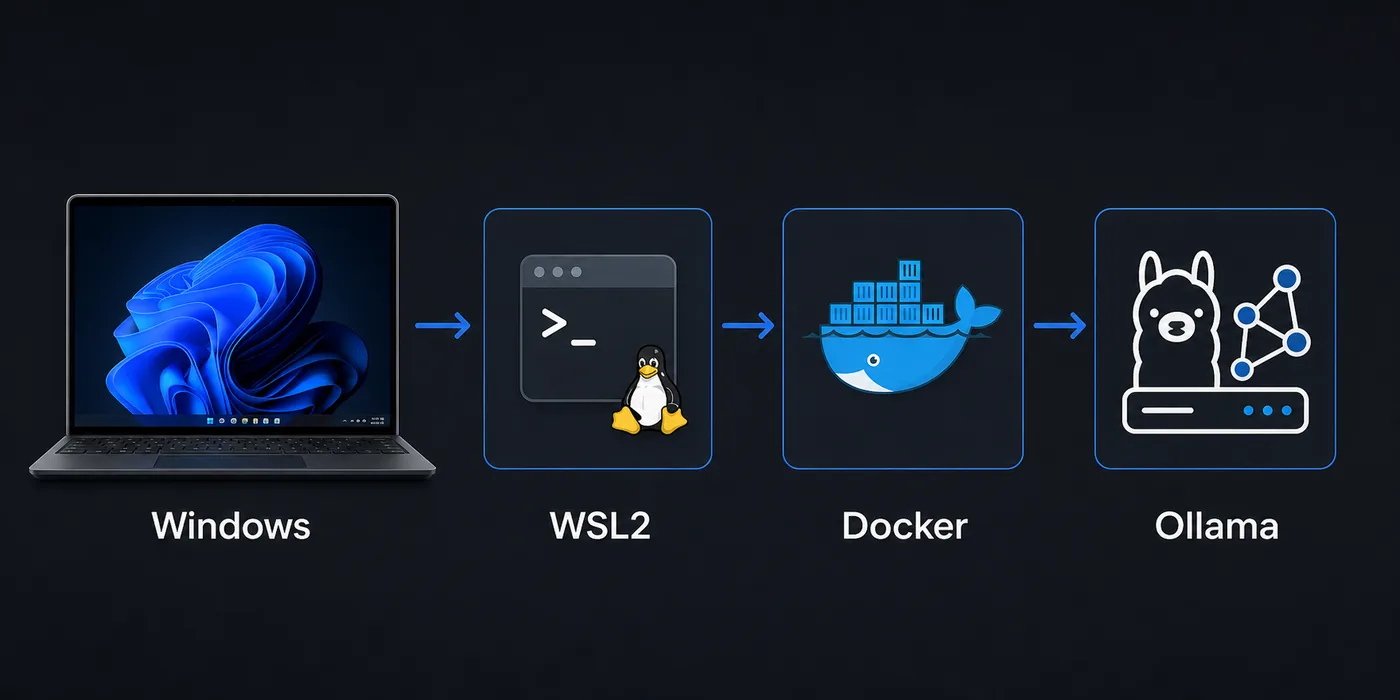
Windows でも Odysseus AI は動かせますが、単純な Linux や macOS の手順より境界が増えます。ブラウザは Windows、シェルは WSL2、コンテナは Docker Desktop、Ollama は別プロセスという構成になりがちです。このガイドでは、アプリ本体、モデル endpoint、ネットワーク境界を順番に確認します。
Windows の選び方
Windows で Linux に近い開発環境を使いたいなら、最初は WSL2 が扱いやすいです。リポジトリのコマンドや依存関係の挙動が読みやすくなります。
Docker Desktop は、隔離された再現性のあるテストをしたいときに有効です。ただし Odysseus AI とホスト側 Ollama の間にネットワーク境界が増えます。
PowerShell から Odysseus AI ゲートウェイを開く前に、プロセスが Windows、WSL2、Docker のどこで動いているか確認します。実行環境と同じ層から接続を試すことが重要です。
Recommended first pass
Windows での Odysseus AI は、まず WSL2 を Linux レイヤーとして使い、分離が必要なときだけ Docker Desktop を足し、Ollama は接続前に単独で確認するのが安全です。localhost は Windows、WSL2、Docker で意味が変わります。
Windows と WSL2 の準備
起動前に、仮想化、WSL2、Docker Desktop の WSL2 backend を確認します。
リポジトリはできれば WSL のホーム配下に置き、/mnt/c や同期フォルダでの権限問題を避けます。
1. Enable the Linux layer
Install or update WSL2, then use a mainstream distribution such as Ubuntu for the first test.
wsl --install
wsl --update
wsl -l -v
2. Clone inside WSL2
Keep the repository in the Linux home directory for fewer permission surprises.
cd ~
git clone https://github.com/odysseus-dev/odysseus.git
cd odysseus
3. Install dependencies from the project instructions
Follow the current README or setup script rather than mixing instructions from older posts.
# Verify commands on the official repository before running them4. Open the local UI from Windows
When the app reports a local port, open that address in the Windows browser and confirm the first screen before configuring model providers.
http://127.0.0.1:78605. PowerShell でゲートウェイを確認する
ファイアウォールやプロバイダー設定を変える前に、ログに表示されたホストとポートを試します。
Invoke-WebRequest http://127.0.0.1:7000 -UseBasicParsing
Invoke-WebRequest http://127.0.0.1:7860 -UseBasicParsing
Docker Desktop の流れ
Docker Desktop は依存関係を隔離して、クリーンな起動確認をするのに向いています。
ただしコンテナ内の localhost はコンテナ自身です。Windows ホストの Ollama へは host.docker.internal などを検討します。
| Setup path | Best for | Watch this |
|---|---|---|
| WSL2 process | Linux-like install flow, easy shell debugging, fewer container layers | Keep files in the WSL filesystem and verify the browser port from Windows. |
| Docker Desktop | Disposable test runs, isolated dependencies, deployment rehearsal | Use the correct host endpoint when the container needs a Windows-hosted service. |
| Windows-only shell | Small helper commands after the stack is working | Many Linux-oriented setup assumptions are easier inside WSL2. |
Ollama の接続先
Ollama は Windows、WSL2、別コンテナのどこでも動き得ます。Odysseus AI から届く endpoint かどうかを確認してください。
モデル設定に入れる前に、同じ実行レイヤーから curl で応答を確認します。
| Where Odysseus AI runs | Where Ollama runs | Endpoint to try first |
|---|---|---|
| WSL2 | Windows host | http://127.0.0.1:11434 or the Windows host gateway, depending on WSL networking |
| Docker container | Windows host | http://host.docker.internal:11434 |
| WSL2 | Same WSL2 distro | http://127.0.0.1:11434 |
| Docker container | Another container | Use the Docker network service name rather than localhost |
Quick endpoint smoke test
curl http://127.0.0.1:11434/api/tagsトラブル対応表
まずアプリのポート、その後モデル endpoint という順番で境界ごとに確認します。
| Symptom | Likely cause | First fix |
|---|---|---|
| The browser cannot open the Odysseus AI page | The app is listening on a different port, bound only inside WSL2, or blocked by a Windows firewall prompt. | Check the app log for the exact port, open 127.0.0.1 from Windows, and allow the local firewall prompt only for trusted networks. |
| Ollama works in Windows but not inside Docker | The container is using localhost, which points back to itself. | Try host.docker.internal:11434 from inside the container or move Ollama into the same Docker network. |
| File changes are slow or permissions look strange | The repository is stored under /mnt/c or a synced Windows folder. | Move the repo to the WSL home directory and reinstall dependencies there. |
| Login or admin password is unclear | A generated credential was missed in setup logs or an old local state is being reused. | Review the current setup output, rotate temporary credentials, and avoid posting secrets in screenshots. |
| Docker Desktop starts but containers cannot reach models | The model server is bound to a host interface the container cannot access. | Verify the model server bind address and test with curl from the same runtime layer. |
安全チェック
最初の成功は localhost に閉じておきます。プロンプト、文書、キー、ローカルパスが含まれる可能性があります。
リモート公開は、認証、TLS、リバースプロキシ、ファイアウォールを理解してからにします。
- Use official repository commands for the install path you are actually running.
- Record whether Odysseus AI is running in WSL2, Docker Desktop, or another host before changing endpoints.
- Test the app UI and the Ollama endpoint separately before connecting them.
- Change any temporary or generated admin credential after the first login.
- Keep the first run bound to local addresses unless you deliberately configure secure remote access.
- Do not publish screenshots that include API keys, generated passwords, local file paths, or private document names.
Safe default
Windows での Odysseus AI は、まず WSL2 を Linux レイヤーとして使い、分離が必要なときだけ Docker Desktop を足し、Ollama は接続前に単独で確認するのが安全です。localhost は Windows、WSL2、Docker で意味が変わります。
FAQ
References
- Official Odysseus AI GitHub repository - Use the project repository as the source of truth for current setup scripts and README changes.
- Microsoft WSL installation documentation - Official Windows guidance for installing and updating WSL2.
- Docker Desktop WSL backend documentation - Explains how Docker Desktop integrates with WSL2 on Windows.
- Ollama API documentation - Useful for checking whether the local model server endpoint responds before connecting it to Odysseus AI.
Related guides
- How to uninstall Odysseus AI - Remove the app safely while choosing which volumes, files, and shared models to keep.
- Odysseus AI Ollama setup - Use this after the Windows layer is healthy and you need model routing details.
- Odysseus AI macOS setup - Compare the Windows path with the Apple Silicon and Docker tradeoffs on Mac.
- PewDiePie AI explained - Read the orientation guide if you are still confirming what Odysseus AI is.
- Official Odysseus repository - Verify current install commands before running them.
2026-07-11
Back to Odysseus AI Wiki