Odysseus AI と Ollama の接続設定: endpoint で迷わない手順
既存の Ollama サーバーを Odysseus AI から使うための実践ガイド。Docker とネイティブ環境の違い、接続確認、初期エラーの直し方を整理します。

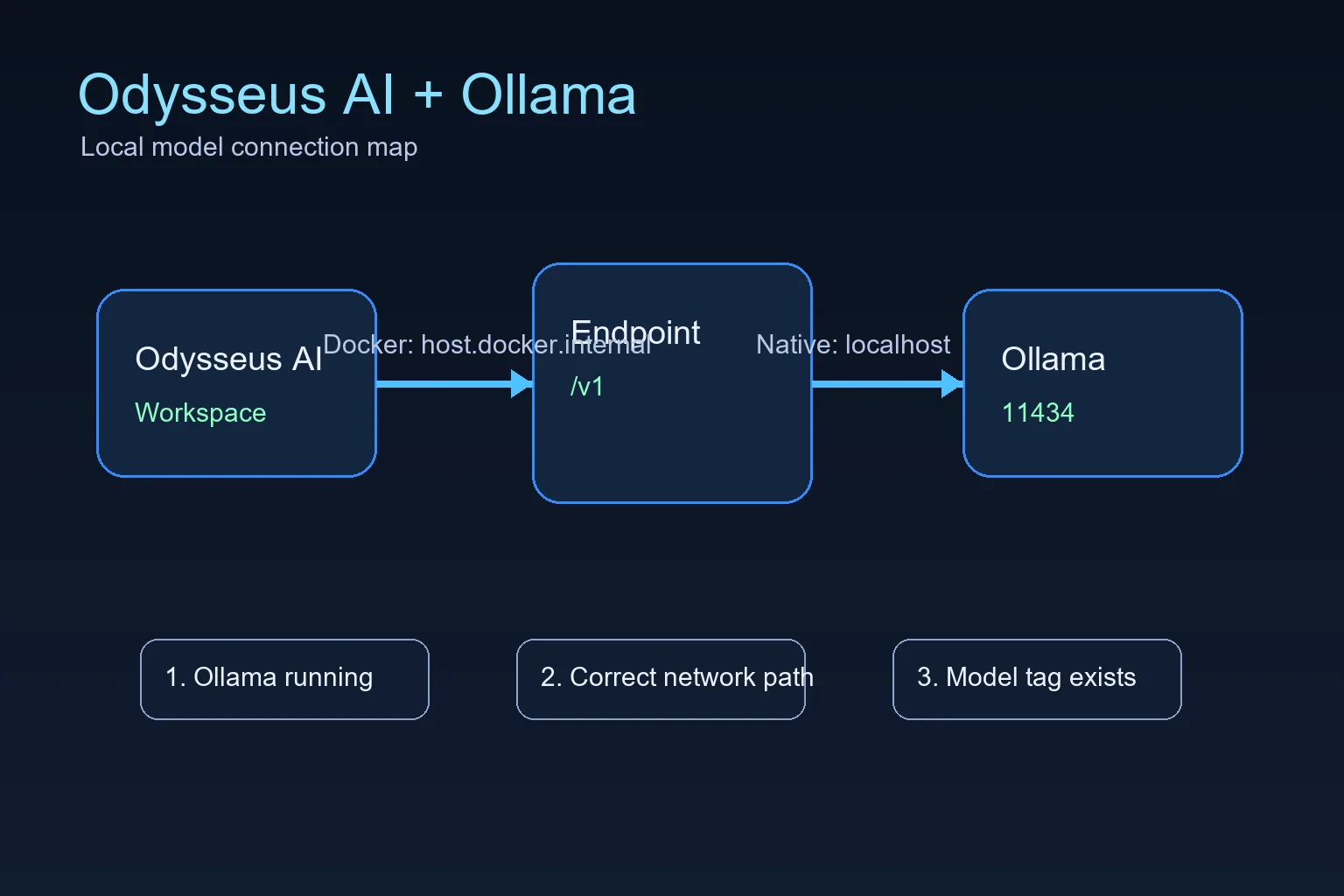
このガイドの内容
Odysseus AI が Docker 内で動き、Ollama がホスト側で動くなら Settings に http://host.docker.internal:11434/v1 を入れます。両方が同じマシンでネイティブ実行なら localhost が基本です。多くの失敗は、正しいポートを違うネットワーク空間から見ていることが原因です。 既存の Ollama サーバーを Odysseus AI から使うための実践ガイド。Docker とネイティブ環境の違い、接続確認、初期エラーの直し方を整理します。
Odysseus AI の実行場所に合う endpoint を使う
The official Odysseus README calls out a Docker-specific Ollama endpoint: when Ollama runs on the host and Odysseus runs in a container, add the host endpoint in Settings. That endpoint is not a magic model name; it is the network address that lets a container reach a service running on the host.
For Docker installs, the practical default is host.docker.internal on port 11434 with the OpenAI-compatible /v1 path. For native installs where Odysseus AI and Ollama run on the same operating system session, start with localhost or 127.0.0.1 instead. Choose one path first, then test it directly before changing model settings.
「Ollama のインストール」と「Odysseus AI への接続」は別々に確認します。まず 11434 ポートとモデルを確認し、その後 Odysseus AI と同じ実行環境から到達できる URL を設定します。
Docker to host Ollama endpoint
http://host.docker.internal:11434/v1Docker: Odysseus コンテナからホストの Ollama へ
This is the highest-value setup because many people follow the recommended Docker path for Odysseus AI but already have Ollama installed on the host. In that layout, localhost inside the container points back to the container, not to your laptop or workstation.
The connection has three parts: Ollama must be running, it must listen on an address the container can reach, and Odysseus AI must store the correct endpoint in Settings.
1. Start Ollama so it listens beyond its own loopback when needed
If Docker cannot reach Ollama, start Ollama with an explicit host binding. Keep this binding limited to trusted local use unless you understand your network exposure.
OLLAMA_HOST=0.0.0.0:11434 ollama serve2. Confirm Ollama has at least one model
Odysseus AI can connect to the endpoint and still show no useful model if Ollama has not pulled anything yet. Pull a small model first if you are only testing the connection.
ollama list
ollama pull llama3.2:3b
3. Put the Docker endpoint in Odysseus AI Settings
Use the OpenAI-compatible base URL in the model or service settings area. Do not use localhost for this Docker-to-host layout unless your Docker platform has been configured differently.
http://host.docker.internal:11434/v14. Check container health before debugging prompts
If the Odysseus service is degraded, fix that first. A model endpoint cannot repair a broken container startup, missing environment file, or unhealthy dependency.
docker compose ps
docker compose logs --tail=120 odysseus
ネイティブ環境: Windows、Linux、macOS の endpoint
When Odysseus AI and Ollama both run natively on the same machine, you usually do not need host.docker.internal. You are no longer crossing from a container into the host, so localhost normally means the machine you expect.
Platform-specific launch scripts can still change ports for the Odysseus web app itself, but the Ollama API is normally on 11434 unless you changed OLLAMA_HOST.
| Setup | Endpoint to try first | What to watch |
|---|---|---|
| Windows native Odysseus + Windows Ollama | http://127.0.0.1:11434/v1 | Use localhost when both services run natively on the same Windows machine. |
| Linux native Odysseus + Ollama | http://127.0.0.1:11434/v1 | Check service permissions if either process runs as a background service. |
| macOS or Apple Silicon native path | http://127.0.0.1:11434/v1 | The Odysseus UI port can differ, but Ollama usually remains on 11434. |
| Odysseus in Docker + host Ollama | http://host.docker.internal:11434/v1 | Use the Docker host name because container localhost is not the host machine. |
Odysseus AI と Ollama 接続エラーの確認
Work from the network layer upward. First prove Ollama answers locally, then prove Docker can reach it, then adjust Odysseus model settings. Randomly changing model names or ports usually makes the problem harder to isolate.
| Symptom | Likely cause | Fix |
|---|---|---|
| Connection refused | Ollama is not running or is listening only where Odysseus cannot reach it. | Start Ollama, confirm port 11434, and use an explicit OLLAMA_HOST binding for Docker-to-host testing. |
| Host browser works but Docker fails | The endpoint uses localhost inside the container. | Switch the endpoint to http://host.docker.internal:11434/v1. |
| No model appears | No model has been pulled or the model tag is wrong. | Run ollama list, pull a small model, and select the exact tag. |
| Slow first response | The model is loading or too large for the machine. | Test a smaller model before agents, tools, or documents. |
| Unexpected LAN exposure | A service was bound to all interfaces without a trust boundary. | Return to localhost-only binding unless firewall, VPN, and auth are intentional. |
信頼する前の最終チェックリスト
A working setup should pass these checks in order. Stop at the first failure and fix that layer instead of jumping ahead.
- Ollama responds on the host and ollama list shows a model.
- The Odysseus service is healthy in Docker or native logs.
- The endpoint matches the runtime layout.
- A small prompt works before larger agents or document workflows.
- Any LAN exposure is authenticated and intentional.
最初はローカルのままにする
Connecting Odysseus AI to Ollama does not require publishing either service to the public internet. Keep both local until authentication, firewall rules, and reverse proxy behavior are deliberate.
2026年の検証メモ: Ollama 接続を切り分ける
Odysseus AI と Ollama の接続で迷ったときは、まずアプリ本体、ネットワーク境界、モデル選択を分けて確認します。Docker コンテナ内の localhost と、Mac や Windows ホスト上の localhost は同じ場所を指しません。そのため、同じ Ollama でも実行形態によって入力すべき URL が変わります。
ネイティブ実行では 127.0.0.1:11434/v1 を先に試し、Docker からホスト側 Ollama に接続する場合は host.docker.internal:11434/v1 を使います。どちらの場合も、Odysseus の設定画面を変更する前に Ollama 単体でモデル一覧と小さなプロンプトを確認しておくと、問題の切り分けが速くなります。
公開ネットワークへ開放する判断は最後にします。初回検証ではローカルホストの範囲に保ち、認証、ファイアウォール、リバースプロキシの設計が決まってから外部アクセスを検討してください。
| 検証項目 | 望ましい結果 | 失敗した場合 |
|---|---|---|
| Ollama 単体確認 | ホスト上で Ollama が応答し、利用するモデルタグが存在する。 | Ollama を起動し、軽量モデルを pull してから再確認します。 |
| Docker からホストへ接続 | コンテナ内の Odysseus は host.docker.internal:11434/v1 を使う。 | localhost を使っていないか確認し、Docker とホストの境界を切り分けます。 |
| ネイティブ実行 | 同じマシン上の Odysseus と Ollama は 127.0.0.1:11434/v1 を使う。 | Docker 用ホスト名を削除し、アプリを再起動してから短いプロンプトで試します。 |
- アプリの起動確認、Ollama の API 確認、モデルタグ確認を順番に進めます。
- 設定変更は一度に一つだけ行い、成功したエンドポイントを記録します。
- 初回検証では LAN やインターネットに公開せず、ローカルで安全に確認します。
Odysseus AI Ollama FAQ
公式情報と参考リンク
- Official Odysseus AI GitHub repository - Docker, Windows, Apple Silicon, and Ollama endpoint guidance.
- Ollama API documentation - Local model server API behavior.
- Docker Desktop networking documentation - host.docker.internal host networking behavior.
関連する Odysseus AI セットアップ
- Local AI agent dashboard comparison - Compare Odysseus AI with other local dashboard choices before committing to a setup path.
- Odysseus AI Windows セットアップ - WSL2、Docker Desktop、Ollama endpoint、ポート、ファイアウォールを確認する Windows 向けガイドです。
- Odysseus AI macOS セットアップ - この追加セクションは、読者が Docker、ネイティブ実行、Ollama エンドポイントを混同しないようにするための更新です。
- PewDiePie AI / Odysseus AI 解説 - 2026年の検証メモを追加し、公式ソース、ローカル実行、Ollama 連携、関連ガイドへの導線を明確にしました。
- Official Odysseus README - Verify the current upstream commands.
- How to use Odysseus AI - Move from setup to a safe first task and daily workflow.
2026-07-11
Odysseus AI Wiki に戻る