Odysseus AI와 Ollama 연결 설정: endpoint를 헷갈리지 않는 방법
기존 Ollama 서버를 Odysseus AI에서 쓰기 위한 실전 가이드입니다. Docker와 네이티브 경로, endpoint 확인, 초기 오류 해결을 정리했습니다.

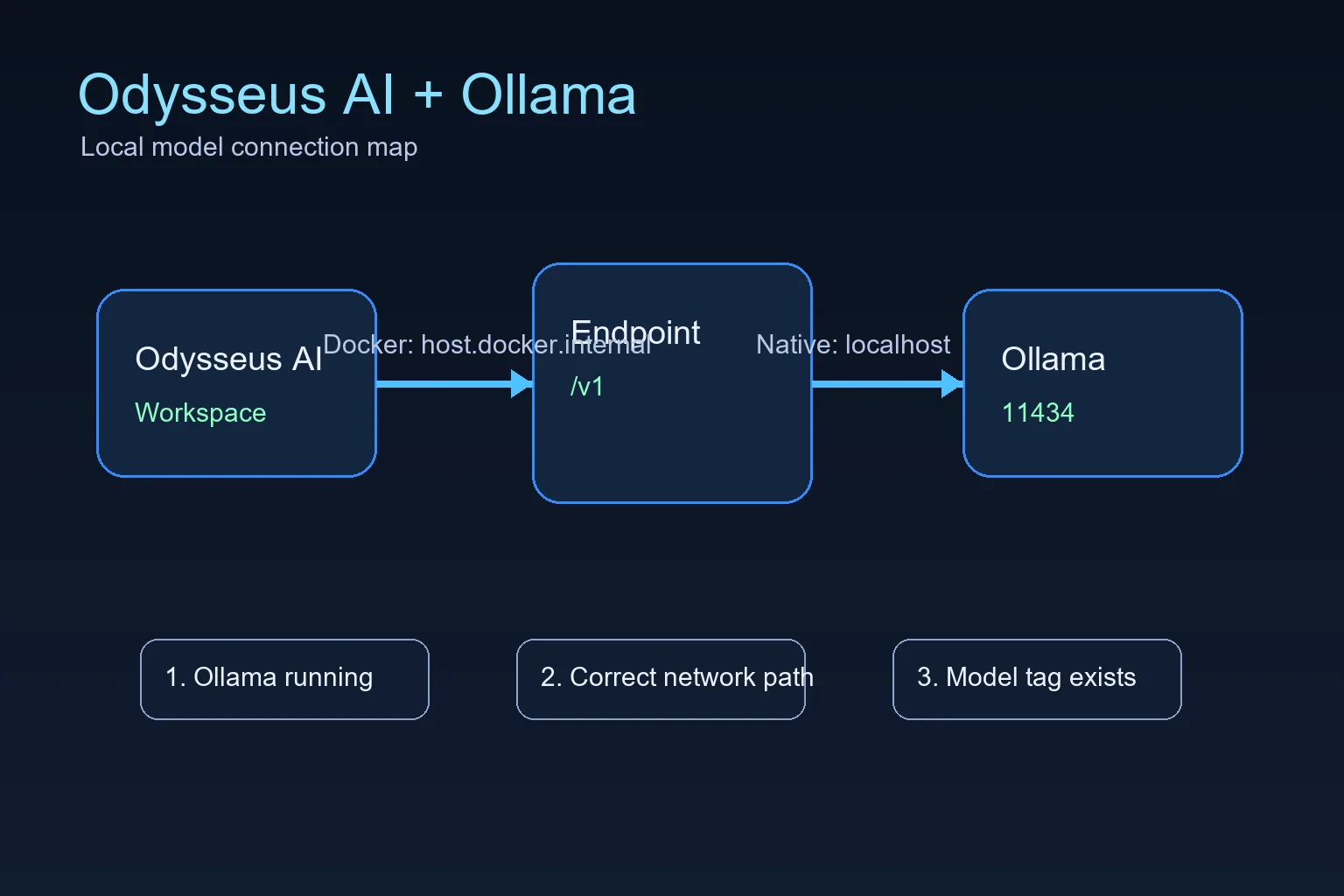
이 가이드의 내용
Odysseus AI가 Docker에서 실행되고 Ollama가 호스트에서 실행된다면 Settings에 http://host.docker.internal:11434/v1 을 사용하세요. 둘 다 같은 머신에서 네이티브로 실행된다면 보통 localhost가 맞습니다. 가장 흔한 문제는 올바른 포트를 잘못된 네트워크 공간에서 바라보는 것입니다. 기존 Ollama 서버를 Odysseus AI에서 쓰기 위한 실전 가이드입니다. Docker와 네이티브 경로, endpoint 확인, 초기 오류 해결을 정리했습니다.
Odysseus AI가 실행되는 위치에 맞는 endpoint 사용
The official Odysseus README calls out a Docker-specific Ollama endpoint: when Ollama runs on the host and Odysseus runs in a container, add the host endpoint in Settings. That endpoint is not a magic model name; it is the network address that lets a container reach a service running on the host.
For Docker installs, the practical default is host.docker.internal on port 11434 with the OpenAI-compatible /v1 path. For native installs where Odysseus AI and Ollama run on the same operating system session, start with localhost or 127.0.0.1 instead. Choose one path first, then test it directly before changing model settings.
“Ollama 설치”와 “Odysseus AI 연결”을 별도 단계로 확인하세요. 먼저 11434 포트와 모델을 검증한 다음 Odysseus AI 실행 환경에서 접근 가능한 주소를 설정합니다.
Docker to host Ollama endpoint
http://host.docker.internal:11434/v1Docker: Odysseus 컨테이너에서 호스트 Ollama로
This is the highest-value setup because many people follow the recommended Docker path for Odysseus AI but already have Ollama installed on the host. In that layout, localhost inside the container points back to the container, not to your laptop or workstation.
The connection has three parts: Ollama must be running, it must listen on an address the container can reach, and Odysseus AI must store the correct endpoint in Settings.
1. Start Ollama so it listens beyond its own loopback when needed
If Docker cannot reach Ollama, start Ollama with an explicit host binding. Keep this binding limited to trusted local use unless you understand your network exposure.
OLLAMA_HOST=0.0.0.0:11434 ollama serve2. Confirm Ollama has at least one model
Odysseus AI can connect to the endpoint and still show no useful model if Ollama has not pulled anything yet. Pull a small model first if you are only testing the connection.
ollama list
ollama pull llama3.2:3b
3. Put the Docker endpoint in Odysseus AI Settings
Use the OpenAI-compatible base URL in the model or service settings area. Do not use localhost for this Docker-to-host layout unless your Docker platform has been configured differently.
http://host.docker.internal:11434/v14. Check container health before debugging prompts
If the Odysseus service is degraded, fix that first. A model endpoint cannot repair a broken container startup, missing environment file, or unhealthy dependency.
docker compose ps
docker compose logs --tail=120 odysseus
네이티브: Windows, Linux, macOS endpoint
When Odysseus AI and Ollama both run natively on the same machine, you usually do not need host.docker.internal. You are no longer crossing from a container into the host, so localhost normally means the machine you expect.
Platform-specific launch scripts can still change ports for the Odysseus web app itself, but the Ollama API is normally on 11434 unless you changed OLLAMA_HOST.
| Setup | Endpoint to try first | What to watch |
|---|---|---|
| Windows native Odysseus + Windows Ollama | http://127.0.0.1:11434/v1 | Use localhost when both services run natively on the same Windows machine. |
| Linux native Odysseus + Ollama | http://127.0.0.1:11434/v1 | Check service permissions if either process runs as a background service. |
| macOS or Apple Silicon native path | http://127.0.0.1:11434/v1 | The Odysseus UI port can differ, but Ollama usually remains on 11434. |
| Odysseus in Docker + host Ollama | http://host.docker.internal:11434/v1 | Use the Docker host name because container localhost is not the host machine. |
Odysseus AI와 Ollama 연결 오류 해결
Work from the network layer upward. First prove Ollama answers locally, then prove Docker can reach it, then adjust Odysseus model settings. Randomly changing model names or ports usually makes the problem harder to isolate.
| Symptom | Likely cause | Fix |
|---|---|---|
| Connection refused | Ollama is not running or is listening only where Odysseus cannot reach it. | Start Ollama, confirm port 11434, and use an explicit OLLAMA_HOST binding for Docker-to-host testing. |
| Host browser works but Docker fails | The endpoint uses localhost inside the container. | Switch the endpoint to http://host.docker.internal:11434/v1. |
| No model appears | No model has been pulled or the model tag is wrong. | Run ollama list, pull a small model, and select the exact tag. |
| Slow first response | The model is loading or too large for the machine. | Test a smaller model before agents, tools, or documents. |
| Unexpected LAN exposure | A service was bound to all interfaces without a trust boundary. | Return to localhost-only binding unless firewall, VPN, and auth are intentional. |
설정을 신뢰하기 전 최종 체크리스트
A working setup should pass these checks in order. Stop at the first failure and fix that layer instead of jumping ahead.
- Ollama responds on the host and ollama list shows a model.
- The Odysseus service is healthy in Docker or native logs.
- The endpoint matches the runtime layout.
- A small prompt works before larger agents or document workflows.
- Any LAN exposure is authenticated and intentional.
첫 설정은 로컬로 유지
Connecting Odysseus AI to Ollama does not require publishing either service to the public internet. Keep both local until authentication, firewall rules, and reverse proxy behavior are deliberate.
2026 검증 메모: Ollama 연결을 단계별로 분리하기
Odysseus AI와 Ollama 연결이 실패할 때는 앱 실행, 네트워크 경계, 모델 선택을 따로 확인해야 합니다. Docker 컨테이너 안의 localhost와 Windows 또는 Mac 호스트의 localhost는 같은 위치를 가리키지 않습니다. 그래서 같은 Ollama 서버라도 Odysseus가 어디에서 실행되는지에 따라 설정해야 할 URL이 달라집니다.
네이티브 실행에서는 127.0.0.1:11434/v1을 먼저 확인하고, Docker 안의 Odysseus가 호스트의 Ollama에 접근해야 한다면 host.docker.internal:11434/v1을 사용합니다. 설정 화면을 바꾸기 전에 Ollama 단독으로 모델 목록과 짧은 프롬프트가 동작하는지 확인하면 원인을 훨씬 빠르게 좁힐 수 있습니다.
외부 네트워크 노출은 마지막 단계로 미루는 것이 좋습니다. 첫 검증은 localhost 범위에서 끝내고, 인증, 방화벽, 리버스 프록시 규칙을 정한 뒤에만 LAN 또는 인터넷 접근을 고려하세요.
| 확인 항목 | 정상 결과 | 실패 시 조치 |
|---|---|---|
| Ollama 단독 확인 | 호스트에서 Ollama가 응답하고 사용할 모델 태그가 존재합니다. | Ollama를 시작하고 작은 모델을 받은 뒤 다시 확인합니다. |
| Docker에서 호스트 접근 | 컨테이너의 Odysseus는 host.docker.internal:11434/v1을 사용합니다. | localhost를 쓰고 있지 않은지 확인하고 컨테이너와 호스트 경계를 분리합니다. |
| 네이티브 실행 | 같은 머신의 Odysseus와 Ollama는 127.0.0.1:11434/v1을 사용합니다. | Docker용 호스트 이름을 제거하고 앱을 다시 시작한 뒤 짧은 프롬프트로 테스트합니다. |
- 앱 실행 확인, Ollama API 확인, 모델 태그 확인을 순서대로 진행합니다.
- 설정은 한 번에 하나만 바꾸고 성공한 엔드포인트를 기록합니다.
- 첫 검증에서는 LAN이나 인터넷에 공개하지 말고 로컬에서 안전하게 확인합니다.
Odysseus AI Ollama FAQ
출처와 공식 참고 자료
- Official Odysseus AI GitHub repository - Docker, Windows, Apple Silicon, and Ollama endpoint guidance.
- Ollama API documentation - Local model server API behavior.
- Docker Desktop networking documentation - host.docker.internal host networking behavior.
관련 Odysseus AI 설정 경로
- Local AI agent dashboard comparison - Compare Odysseus AI with other local dashboard choices before committing to a setup path.
- Odysseus AI Windows 설정 - WSL2, Docker Desktop, Ollama 엔드포인트, 포트, 방화벽을 확인하는 Windows 가이드입니다.
- Odysseus AI macOS 설정 - 이 섹션은 설정을 바꾸기 전에 Docker, 네이티브 실행, Ollama 엔드포인트를 분리해 점검하도록 돕습니다.
- PewDiePie AI / Odysseus AI 설명 - 공식 소스, 로컬 실행, Ollama, 관련 설정 가이드를 구분하는 2026 검증 메모를 추가했습니다.
- Official Odysseus README - Verify the current upstream commands.
- How to use Odysseus AI - Move from setup to a safe first task and daily workflow.
2026-07-11
Odysseus AI Wiki로 돌아가기