Odysseus AI mit Ollama verbinden: Setup ohne Endpoint-Raten
Praktische Anleitung, um Odysseus AI auf einen vorhandenen Ollama-Server zu zeigen, inklusive Docker- und nativer Pfade, Endpoint-Checks und häufiger Fehler.

In dieser Anleitung
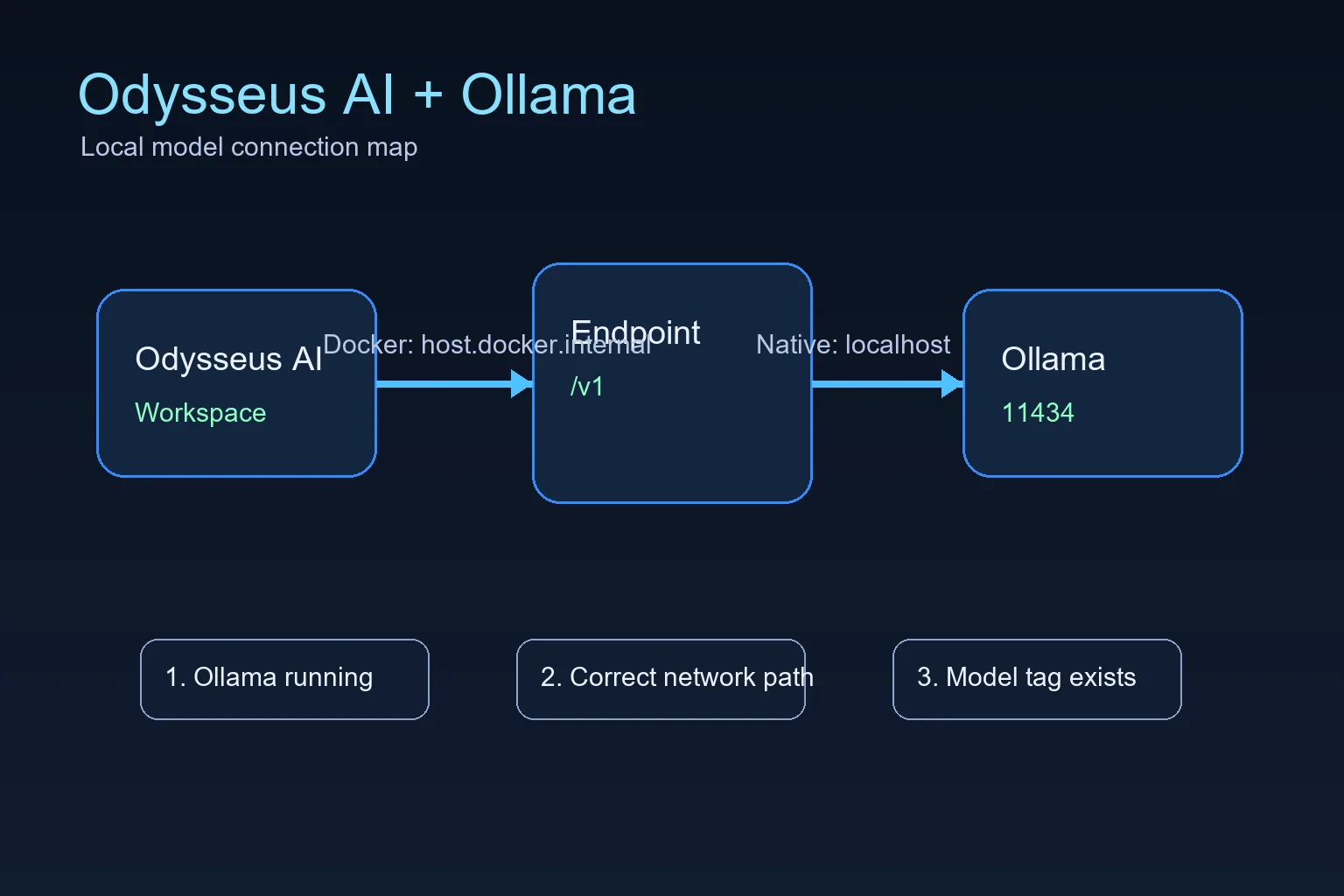
Wenn Odysseus AI in Docker läuft und Ollama auf dem Host, nutze http://host.docker.internal:11434/v1 in Settings. Wenn beide nativ auf derselben Maschine laufen, ist localhost meist richtig. Der häufigste Fehler ist der richtige Port aus dem falschen Netzwerkraum. Praktische Anleitung, um Odysseus AI auf einen vorhandenen Ollama-Server zu zeigen, inklusive Docker- und nativer Pfade, Endpoint-Checks und häufiger Fehler.
Nutze den Endpoint passend zum Odysseus-AI-Laufzeitort
The official Odysseus README calls out a Docker-specific Ollama endpoint: when Ollama runs on the host and Odysseus runs in a container, add the host endpoint in Settings. That endpoint is not a magic model name; it is the network address that lets a container reach a service running on the host.
For Docker installs, the practical default is host.docker.internal on port 11434 with the OpenAI-compatible /v1 path. For native installs where Odysseus AI and Ollama run on the same operating system session, start with localhost or 127.0.0.1 instead. Choose one path first, then test it directly before changing model settings.
Behandle „Ollama installieren“ und „Odysseus AI mit Ollama verbinden“ als zwei getrennte Prüfungen. Teste zuerst Port 11434 und ein verfügbares Modell; trage danach einen Endpunkt ein, den die Laufzeit von Odysseus AI wirklich erreicht.
Docker to host Ollama endpoint
http://host.docker.internal:11434/v1Docker: Odysseus-Container zu Ollama auf dem Host
This is the highest-value setup because many people follow the recommended Docker path for Odysseus AI but already have Ollama installed on the host. In that layout, localhost inside the container points back to the container, not to your laptop or workstation.
The connection has three parts: Ollama must be running, it must listen on an address the container can reach, and Odysseus AI must store the correct endpoint in Settings.
1. Start Ollama so it listens beyond its own loopback when needed
If Docker cannot reach Ollama, start Ollama with an explicit host binding. Keep this binding limited to trusted local use unless you understand your network exposure.
OLLAMA_HOST=0.0.0.0:11434 ollama serve2. Confirm Ollama has at least one model
Odysseus AI can connect to the endpoint and still show no useful model if Ollama has not pulled anything yet. Pull a small model first if you are only testing the connection.
ollama list
ollama pull llama3.2:3b
3. Put the Docker endpoint in Odysseus AI Settings
Use the OpenAI-compatible base URL in the model or service settings area. Do not use localhost for this Docker-to-host layout unless your Docker platform has been configured differently.
http://host.docker.internal:11434/v14. Check container health before debugging prompts
If the Odysseus service is degraded, fix that first. A model endpoint cannot repair a broken container startup, missing environment file, or unhealthy dependency.
docker compose ps
docker compose logs --tail=120 odysseus
Nativ: Windows-, Linux- und macOS-Endpoints
When Odysseus AI and Ollama both run natively on the same machine, you usually do not need host.docker.internal. You are no longer crossing from a container into the host, so localhost normally means the machine you expect.
Platform-specific launch scripts can still change ports for the Odysseus web app itself, but the Ollama API is normally on 11434 unless you changed OLLAMA_HOST.
| Setup | Endpoint to try first | What to watch |
|---|---|---|
| Windows native Odysseus + Windows Ollama | http://127.0.0.1:11434/v1 | Use localhost when both services run natively on the same Windows machine. |
| Linux native Odysseus + Ollama | http://127.0.0.1:11434/v1 | Check service permissions if either process runs as a background service. |
| macOS or Apple Silicon native path | http://127.0.0.1:11434/v1 | The Odysseus UI port can differ, but Ollama usually remains on 11434. |
| Odysseus in Docker + host Ollama | http://host.docker.internal:11434/v1 | Use the Docker host name because container localhost is not the host machine. |
Verbindungsfehler zwischen Odysseus AI und Ollama
Work from the network layer upward. First prove Ollama answers locally, then prove Docker can reach it, then adjust Odysseus model settings. Randomly changing model names or ports usually makes the problem harder to isolate.
| Symptom | Likely cause | Fix |
|---|---|---|
| Connection refused | Ollama is not running or is listening only where Odysseus cannot reach it. | Start Ollama, confirm port 11434, and use an explicit OLLAMA_HOST binding for Docker-to-host testing. |
| Host browser works but Docker fails | The endpoint uses localhost inside the container. | Switch the endpoint to http://host.docker.internal:11434/v1. |
| No model appears | No model has been pulled or the model tag is wrong. | Run ollama list, pull a small model, and select the exact tag. |
| Slow first response | The model is loading or too large for the machine. | Test a smaller model before agents, tools, or documents. |
| Unexpected LAN exposure | A service was bound to all interfaces without a trust boundary. | Return to localhost-only binding unless firewall, VPN, and auth are intentional. |
Abschlusscheck vor produktiver Nutzung
A working setup should pass these checks in order. Stop at the first failure and fix that layer instead of jumping ahead.
- Ollama responds on the host and ollama list shows a model.
- The Odysseus service is healthy in Docker or native logs.
- The endpoint matches the runtime layout.
- A small prompt works before larger agents or document workflows.
- Any LAN exposure is authenticated and intentional.
Das erste Setup lokal halten
Connecting Odysseus AI to Ollama does not require publishing either service to the public internet. Keep both local until authentication, firewall rules, and reverse proxy behavior are deliberate.
2026 update: Odysseus AI Ollama einrichten
Der neue Abschnitt trennt Docker, native Ausfuehrung und Ollama-Endpunkte, bevor Einstellungen geaendert werden.
Aktualisiert mit 2026-Hinweisen zu offiziellen Quellen, lokaler Ausfuehrung, Ollama und passenden Setup-Guides.
| Pruefung | Gutes Ergebnis | Massnahme bei Fehler |
|---|---|---|
| Official source | Use the upstream GitHub repository as the command source. | Compare copied commands with the current README. |
| Local runtime | Know whether Odysseus runs natively, in Docker, or remotely. | Pick one setup path before changing endpoints. |
| Related guide | Use the sibling article for detailed Mac or Ollama steps. | Follow the internal link instead of mixing keyword intents. |
- Der neue Abschnitt trennt Docker, native Ausfuehrung und Ollama-Endpunkte, bevor Einstellungen geaendert werden.
- Aktualisiert mit 2026-Hinweisen zu offiziellen Quellen, lokaler Ausfuehrung, Ollama und passenden Setup-Guides.
- Keep the page intent separate from sibling setup guides.
Odysseus AI Ollama FAQ
Quellen und offizielle Referenzen
- Official Odysseus AI GitHub repository - Docker, Windows, Apple Silicon, and Ollama endpoint guidance.
- Ollama API documentation - Local model server API behavior.
- Docker Desktop networking documentation - host.docker.internal host networking behavior.
Verwandte Odysseus-AI-Setup-Pfade
- Local AI agent dashboard comparison - Compare Odysseus AI with other local dashboard choices before committing to a setup path.
- Odysseus AI unter Windows - Windows-Leitfaden für WSL2, Docker Desktop, Ollama-Endpunkte, Ports und Firewall.
- Odysseus AI macOS Setup - Der neue Abschnitt trennt Docker, native Ausfuehrung und Ollama-Endpunkte, bevor Einstellungen geaendert werden.
- PewDiePie AI / Odysseus AI erklaert - Aktualisiert mit 2026-Hinweisen zu offiziellen Quellen, lokaler Ausfuehrung, Ollama und passenden Setup-Guides.
- Official Odysseus README - Verify the current upstream commands.
- How to use Odysseus AI - Move from setup to a safe first task and daily workflow.
2026-07-11
Zurück zum Odysseus AI Wiki