Odysseus AI su Windows: WSL2, Docker Desktop e Ollama
Guida pratica per installare Odysseus AI su Windows, scegliere WSL2 o Docker Desktop, collegare Ollama senza confondere localhost e controllare porte, credenziali e firewall.

In this guide
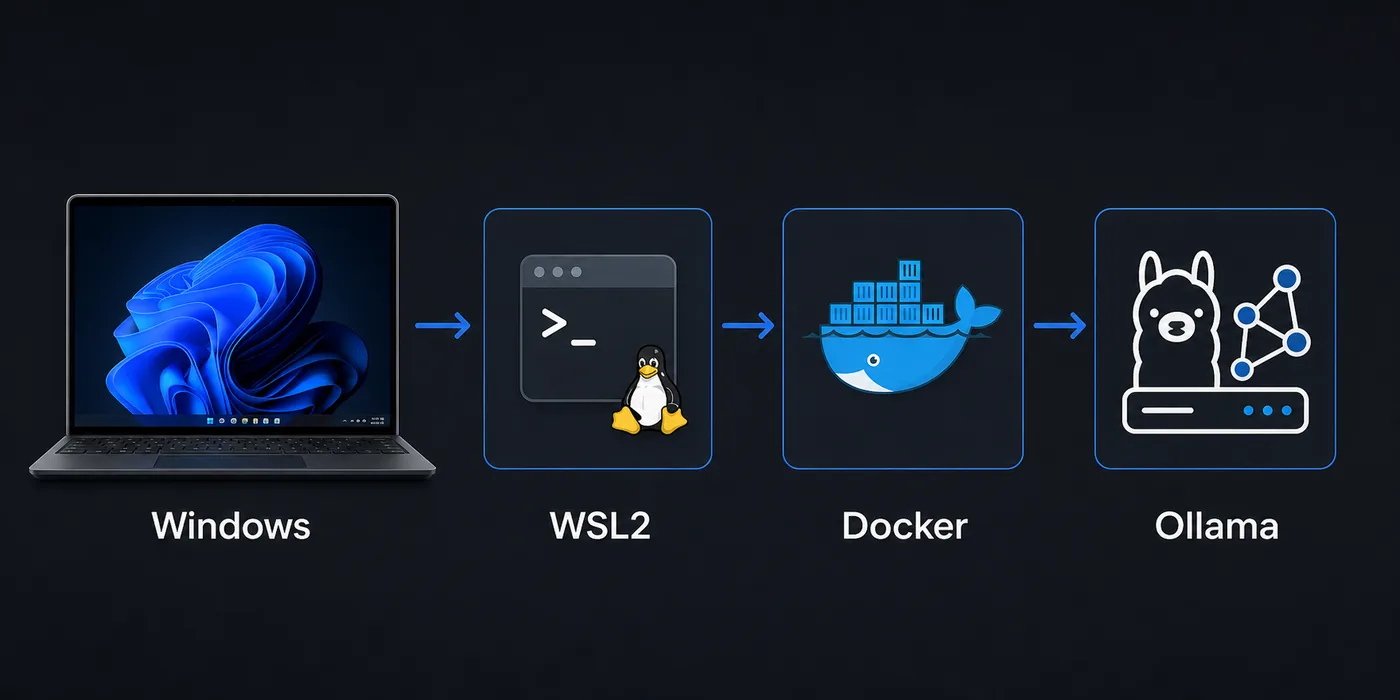
Windows può eseguire Odysseus AI, ma aggiunge più livelli: browser in Windows, shell in WSL2, container in Docker Desktop e magari Ollama in un processo diverso. Questa guida separa i livelli per verificare app, endpoint del modello e rete nell'ordine corretto.
Scegliere il percorso Windows
Parti da WSL2 se vuoi un ambiente simile a Linux su Windows.
Usa Docker Desktop per test isolati e ripetibili, sapendo che aggiunge un confine di rete.
Prima di aprire il gateway Odysseus AI da PowerShell, identifica dove gira il processo. Usa PowerShell per una porta Windows, la shell WSL per WSL2 e una prova nel container per Docker.
Recommended first pass
Su Windows conviene partire da WSL2, usare Docker Desktop quando serve isolamento e provare Ollama separatamente prima di collegarlo. L'errore più comune è dimenticare che localhost cambia significato tra Windows, WSL2 e container.
Preparare Windows e WSL2
Prima di avviare, verifica virtualizzazione, WSL2 e backend WSL2 di Docker Desktop se userai container.
Clona il repository nel filesystem WSL per evitare lentezza e permessi strani.
1. Enable the Linux layer
Install or update WSL2, then use a mainstream distribution such as Ubuntu for the first test.
wsl --install
wsl --update
wsl -l -v
2. Clone inside WSL2
Keep the repository in the Linux home directory for fewer permission surprises.
cd ~
git clone https://github.com/odysseus-dev/odysseus.git
cd odysseus
3. Install dependencies from the project instructions
Follow the current README or setup script rather than mixing instructions from older posts.
# Verify commands on the official repository before running them4. Open the local UI from Windows
When the app reports a local port, open that address in the Windows browser and confirm the first screen before configuring model providers.
http://127.0.0.1:78605. Verificare il gateway con PowerShell
Prova host e porta indicati dal processo prima di modificare firewall o provider.
Invoke-WebRequest http://127.0.0.1:7000 -UseBasicParsing
Invoke-WebRequest http://127.0.0.1:7860 -UseBasicParsing
Flusso Docker Desktop
Docker Desktop è utile per verificare un avvio pulito e isolato.
Dentro un container, localhost è il container. Per Ollama sul host Windows prova host.docker.internal.
| Setup path | Best for | Watch this |
|---|---|---|
| WSL2 process | Linux-like install flow, easy shell debugging, fewer container layers | Keep files in the WSL filesystem and verify the browser port from Windows. |
| Docker Desktop | Disposable test runs, isolated dependencies, deployment rehearsal | Use the correct host endpoint when the container needs a Windows-hosted service. |
| Windows-only shell | Small helper commands after the stack is working | Many Linux-oriented setup assumptions are easier inside WSL2. |
Routing Ollama
Ollama può girare in Windows, WSL2 o un altro container. Conta l'endpoint raggiungibile dal livello dove gira Odysseus AI.
Testa con curl dallo stesso livello prima di salvare la configurazione.
| Where Odysseus AI runs | Where Ollama runs | Endpoint to try first |
|---|---|---|
| WSL2 | Windows host | http://127.0.0.1:11434 or the Windows host gateway, depending on WSL networking |
| Docker container | Windows host | http://host.docker.internal:11434 |
| WSL2 | Same WSL2 distro | http://127.0.0.1:11434 |
| Docker container | Another container | Use the Docker network service name rather than localhost |
Quick endpoint smoke test
curl http://127.0.0.1:11434/api/tagsMatrice problemi
Debugga un confine alla volta: porta dell'app, browser e poi endpoint del modello.
| Symptom | Likely cause | First fix |
|---|---|---|
| The browser cannot open the Odysseus AI page | The app is listening on a different port, bound only inside WSL2, or blocked by a Windows firewall prompt. | Check the app log for the exact port, open 127.0.0.1 from Windows, and allow the local firewall prompt only for trusted networks. |
| Ollama works in Windows but not inside Docker | The container is using localhost, which points back to itself. | Try host.docker.internal:11434 from inside the container or move Ollama into the same Docker network. |
| File changes are slow or permissions look strange | The repository is stored under /mnt/c or a synced Windows folder. | Move the repo to the WSL home directory and reinstall dependencies there. |
| Login or admin password is unclear | A generated credential was missed in setup logs or an old local state is being reused. | Review the current setup output, rotate temporary credentials, and avoid posting secrets in screenshots. |
| Docker Desktop starts but containers cannot reach models | The model server is bound to a host interface the container cannot access. | Verify the model server bind address and test with curl from the same runtime layer. |
Checklist sicurezza
Mantieni locale il primo avvio riuscito: il workspace può contenere prompt, documenti e chiavi.
Apri accesso remoto solo dopo autenticazione, TLS, reverse proxy e firewall consapevoli.
- Use official repository commands for the install path you are actually running.
- Record whether Odysseus AI is running in WSL2, Docker Desktop, or another host before changing endpoints.
- Test the app UI and the Ollama endpoint separately before connecting them.
- Change any temporary or generated admin credential after the first login.
- Keep the first run bound to local addresses unless you deliberately configure secure remote access.
- Do not publish screenshots that include API keys, generated passwords, local file paths, or private document names.
Safe default
Su Windows conviene partire da WSL2, usare Docker Desktop quando serve isolamento e provare Ollama separatamente prima di collegarlo. L'errore più comune è dimenticare che localhost cambia significato tra Windows, WSL2 e container.
FAQ
References
- Official Odysseus AI GitHub repository - Use the project repository as the source of truth for current setup scripts and README changes.
- Microsoft WSL installation documentation - Official Windows guidance for installing and updating WSL2.
- Docker Desktop WSL backend documentation - Explains how Docker Desktop integrates with WSL2 on Windows.
- Ollama API documentation - Useful for checking whether the local model server endpoint responds before connecting it to Odysseus AI.
Related guides
- How to uninstall Odysseus AI - Remove the app safely while choosing which volumes, files, and shared models to keep.
- Odysseus AI Ollama setup - Use this after the Windows layer is healthy and you need model routing details.
- Odysseus AI macOS setup - Compare the Windows path with the Apple Silicon and Docker tradeoffs on Mac.
- PewDiePie AI explained - Read the orientation guide if you are still confirming what Odysseus AI is.
- Official Odysseus repository - Verify current install commands before running them.
2026-07-11
Back to Odysseus AI Wiki