Odysseus AI no Windows: WSL2, Docker Desktop e Ollama
Guia prático para instalar o Odysseus AI no Windows, escolher entre WSL2 e Docker Desktop, conectar o Ollama sem confundir localhost e revisar portas, credenciais e firewall.

In this guide
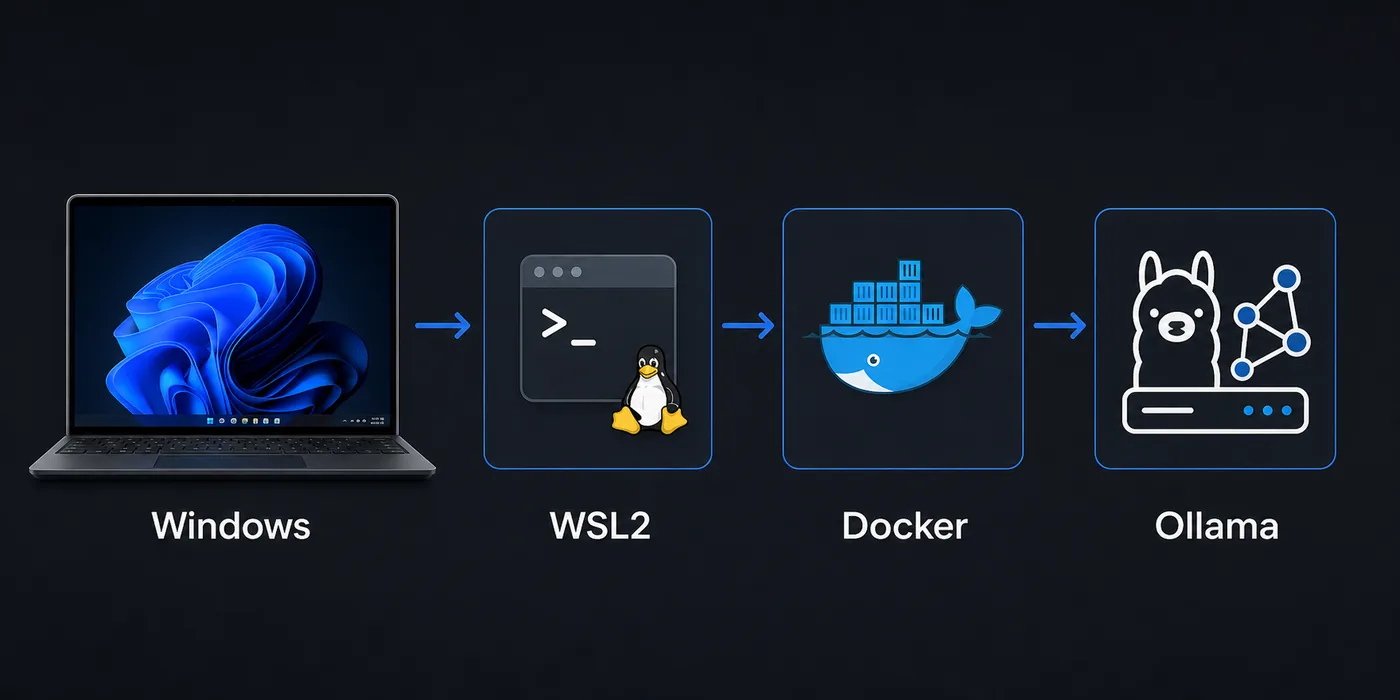
O Windows roda o Odysseus AI, mas adiciona camadas: navegador no Windows, shell no WSL2, contêineres no Docker Desktop e talvez Ollama em outro processo. Este guia separa essas camadas para validar app, endpoint do modelo e rede na ordem certa.
Escolher o caminho no Windows
Comece pelo WSL2 se quiser um ambiente parecido com Linux no Windows.
Use Docker Desktop para testes isolados e repetíveis, lembrando que ele adiciona uma fronteira de rede.
Antes de abrir o gateway do Odysseus AI pelo PowerShell, identifique onde o processo está rodando. Teste portas do Windows no PowerShell, processos WSL2 no shell WSL e Docker dentro do contêiner.
Recommended first pass
No Windows, o caminho mais seguro começa com WSL2, usa Docker Desktop quando isolamento faz sentido e testa o Ollama separadamente antes da conexão. O erro mais comum é esquecer que localhost muda entre Windows, WSL2 e contêineres.
Preparar Windows e WSL2
Antes de iniciar, confirme virtualização, WSL2 e o backend WSL2 do Docker Desktop se for usar contêineres.
Clone o repositório dentro do sistema de arquivos do WSL para reduzir problemas de permissão.
1. Enable the Linux layer
Install or update WSL2, then use a mainstream distribution such as Ubuntu for the first test.
wsl --install
wsl --update
wsl -l -v
2. Clone inside WSL2
Keep the repository in the Linux home directory for fewer permission surprises.
cd ~
git clone https://github.com/odysseus-dev/odysseus.git
cd odysseus
3. Install dependencies from the project instructions
Follow the current README or setup script rather than mixing instructions from older posts.
# Verify commands on the official repository before running them4. Open the local UI from Windows
When the app reports a local port, open that address in the Windows browser and confirm the first screen before configuring model providers.
http://127.0.0.1:78605. Verificar o gateway no PowerShell
Teste o host e a porta informados pelo processo antes de alterar firewall ou provedor.
Invoke-WebRequest http://127.0.0.1:7000 -UseBasicParsing
Invoke-WebRequest http://127.0.0.1:7860 -UseBasicParsing
Fluxo com Docker Desktop
Docker Desktop ajuda a validar uma execução limpa e isolada.
Dentro do contêiner, localhost é o contêiner. Para Ollama no host Windows, teste host.docker.internal.
| Setup path | Best for | Watch this |
|---|---|---|
| WSL2 process | Linux-like install flow, easy shell debugging, fewer container layers | Keep files in the WSL filesystem and verify the browser port from Windows. |
| Docker Desktop | Disposable test runs, isolated dependencies, deployment rehearsal | Use the correct host endpoint when the container needs a Windows-hosted service. |
| Windows-only shell | Small helper commands after the stack is working | Many Linux-oriented setup assumptions are easier inside WSL2. |
Rotas do Ollama
Ollama pode rodar no Windows, no WSL2 ou em outro contêiner. O endpoint correto depende de onde o Odysseus AI roda.
Teste com curl a partir da mesma camada antes de salvar a configuração.
| Where Odysseus AI runs | Where Ollama runs | Endpoint to try first |
|---|---|---|
| WSL2 | Windows host | http://127.0.0.1:11434 or the Windows host gateway, depending on WSL networking |
| Docker container | Windows host | http://host.docker.internal:11434 |
| WSL2 | Same WSL2 distro | http://127.0.0.1:11434 |
| Docker container | Another container | Use the Docker network service name rather than localhost |
Quick endpoint smoke test
curl http://127.0.0.1:11434/api/tagsMatriz de problemas
Depure uma fronteira por vez: porta da aplicação, navegador e depois endpoint do modelo.
| Symptom | Likely cause | First fix |
|---|---|---|
| The browser cannot open the Odysseus AI page | The app is listening on a different port, bound only inside WSL2, or blocked by a Windows firewall prompt. | Check the app log for the exact port, open 127.0.0.1 from Windows, and allow the local firewall prompt only for trusted networks. |
| Ollama works in Windows but not inside Docker | The container is using localhost, which points back to itself. | Try host.docker.internal:11434 from inside the container or move Ollama into the same Docker network. |
| File changes are slow or permissions look strange | The repository is stored under /mnt/c or a synced Windows folder. | Move the repo to the WSL home directory and reinstall dependencies there. |
| Login or admin password is unclear | A generated credential was missed in setup logs or an old local state is being reused. | Review the current setup output, rotate temporary credentials, and avoid posting secrets in screenshots. |
| Docker Desktop starts but containers cannot reach models | The model server is bound to a host interface the container cannot access. | Verify the model server bind address and test with curl from the same runtime layer. |
Checklist de segurança
Mantenha a primeira execução local, pois o workspace pode conter prompts, documentos e chaves.
Só exponha remotamente depois de configurar autenticação, TLS, proxy reverso e firewall.
- Use official repository commands for the install path you are actually running.
- Record whether Odysseus AI is running in WSL2, Docker Desktop, or another host before changing endpoints.
- Test the app UI and the Ollama endpoint separately before connecting them.
- Change any temporary or generated admin credential after the first login.
- Keep the first run bound to local addresses unless you deliberately configure secure remote access.
- Do not publish screenshots that include API keys, generated passwords, local file paths, or private document names.
Safe default
No Windows, o caminho mais seguro começa com WSL2, usa Docker Desktop quando isolamento faz sentido e testa o Ollama separadamente antes da conexão. O erro mais comum é esquecer que localhost muda entre Windows, WSL2 e contêineres.
FAQ
References
- Official Odysseus AI GitHub repository - Use the project repository as the source of truth for current setup scripts and README changes.
- Microsoft WSL installation documentation - Official Windows guidance for installing and updating WSL2.
- Docker Desktop WSL backend documentation - Explains how Docker Desktop integrates with WSL2 on Windows.
- Ollama API documentation - Useful for checking whether the local model server endpoint responds before connecting it to Odysseus AI.
Related guides
- How to uninstall Odysseus AI - Remove the app safely while choosing which volumes, files, and shared models to keep.
- Odysseus AI Ollama setup - Use this after the Windows layer is healthy and you need model routing details.
- Odysseus AI macOS setup - Compare the Windows path with the Apple Silicon and Docker tradeoffs on Mac.
- PewDiePie AI explained - Read the orientation guide if you are still confirming what Odysseus AI is.
- Official Odysseus repository - Verify current install commands before running them.
2026-07-11
Back to Odysseus AI Wiki