How to Run Odysseus AI: Choose a Path, Start Safely, Verify the Workspace
A cross-platform first-run guide for choosing Docker or native setup, connecting model and search services, and checking the workspace before you use it for real work.

On this page
If you are asking how to run Odysseus AI, the safest answer is not one universal command. The right command depends on whether you want Docker isolation, a native Linux or macOS process, a Windows launcher, or an existing Ollama server on the host. This guide gives you a single decision path: prove the machine, start the workspace, connect optional services one at a time, verify the first login, and keep the service local until authentication and networking are understood.
Choose Docker, native, or a platform guide first
The official project presents Docker Compose as the most repeatable starting point for many users. It keeps the application and supporting services in a known stack, makes a clean rebuild easier, and reduces the number of host packages you must manage. The tradeoff is that containers change the meaning of localhost: a service inside the Odysseus network does not automatically see the same localhost as your browser or host operating system.
Native setup is useful when you need direct process control, easier Python-level debugging, or the local acceleration behavior of a specific operating system. It also makes host paths and ports feel more obvious. The cost is that you own the Python environment, dependency versions, service processes, and cleanup. Windows users should usually follow the dedicated Windows guide because WSL2, Docker Desktop, PowerShell, and a host Ollama process can create several network layers at once.
| Path | Best fit | Main tradeoff | Start here |
|---|---|---|---|
| Docker Compose | Repeatable local stack or a clean test | Container networking and volumes need attention | Docker setup guide |
| Native Linux | Host control, debugging, or a simple server | You manage Python and process dependencies | Linux install guide |
| Native macOS | Apple Silicon and host-level local acceleration | Platform-specific scripts and ports matter | macOS setup guide |
| Windows / WSL2 | Windows workstation with Linux tooling | Several shells and network boundaries can overlap | Windows setup guide |
Run the preflight before installation
A failed first run is often an environment problem rather than an Odysseus problem. Before cloning or starting containers, decide where the application will live, where persistent data should remain, and whether the model server is local, remote, or not needed yet. Do not add every optional integration during the first boot; a smaller working baseline gives you a useful error boundary.
Check that the operating system has enough free storage for the source tree, containers, logs, model files, and future database or document data. If you plan to use a local model, treat its RAM and VRAM needs separately from the workspace process. The requirements guide explains why a lightweight UI can coexist with a much heavier inference workload.
Also decide your access boundary. The safest first run is a browser on the same machine using a loopback address. LAN access, a reverse proxy, Tailscale, or public exposure should come later, after the admin password is changed and you know which process owns each port.
Do not confuse the workspace with the model runtime
Odysseus AI is the workspace layer. Ollama, another OpenAI-compatible endpoint, or a remote provider may supply model inference. You can prove that the workspace starts before you solve model routing.
- Confirm Git, Docker Compose or the native runtime required by your chosen path.
- Reserve a persistent folder for the repository, .env file, volumes, logs, and backups.
- Keep the first browser test on localhost; do not bind every service to 0.0.0.0 by habit.
- Write down whether Ollama and SearXNG will run natively, in Docker, or on another host.
- Have the official repository and setup guide open so you can compare commands with the current branch.
Install and start the workspace
For a first run, the Docker path is usually the shortest route to a repeatable baseline. Clone the official repository, inspect the current README, copy the example environment file when the project provides one, and start the Compose stack. Keep the repository branch and setup instructions aligned; do not invent a release version or assume that a community tutorial matches the current development branch.
A native run follows the same logic with more host responsibility: create the supported Python environment, install the documented dependencies, run the setup step, and start the application process. On Windows, use the project launcher or the dedicated Windows instructions instead of mixing PowerShell commands from a Linux guide with a Docker Desktop container.
-
Start only the baseline
Do not add a reverse proxy, LAN binding, model download, and search provider at the same time. The first goal is a healthy workspace process.
-
Read the logs before changing ports
If the browser cannot connect, inspect the application and container logs first. A port change is not a fix when the process exited during dependency loading.
-
Keep the source branch visible
The official project may distinguish a development branch from a curated main branch. Verify the branch and current setup notes on the official repository before repeating a command from an older article.
git clone https://github.com/odysseus-dev/odysseus.git
cd odysseus
cp .env.example .env
docker compose up -d --buildgit clone https://github.com/odysseus-dev/odysseus.git
cd odysseus
powershell -ExecutionPolicy Bypass -File .\launch-windows.ps1git clone https://github.com/odysseus-dev/odysseus.git
cd odysseus
./start-macos.shConnect Ollama and search services one at a time
Once the workspace itself opens, add the model backend. If Ollama runs natively on the same host as a native Odysseus process, localhost may be the correct endpoint. If Odysseus runs inside Docker while Ollama runs on the host, localhost points back to the container; the Docker guide documents the host gateway form to use instead. Test the endpoint from the same network namespace as the application, not only from your browser.
Search is a separate service boundary. A bundled SearXNG container can usually be addressed by its Compose service name, while an external SearXNG instance needs a URL reachable from the Odysseus process. A green browser page does not prove that model inference or web search works. Run one small model request and one small search test, then save the working endpoint and the failure symptom.
Do not expose Ollama or SearXNG simply because the workspace is reachable. Treat model and search endpoints as separate services with their own authentication, network binding, and update decisions.
| What you are testing | Good first signal | If it fails |
|---|---|---|
| Workspace | Browser reaches the local Odysseus page | Read app/container logs and check the bound port |
| Model backend | A small test request returns a model response | Check endpoint, model availability, and container-to-host routing |
| Search provider | A test search returns a result list | Check SearXNG health and the URL from Odysseus' network |
| Authentication | The temporary admin credential is replaced | Stop exposure work and reset credentials locally |
Verify the first login before real work
The first login is an operational checkpoint, not a formality. Open the documented local port from the same machine, confirm that the page is the Odysseus workspace you just started, and change any temporary admin password immediately. If the page is blank or a reverse proxy is involved, go back to the direct local address before debugging the proxy.
After authentication, confirm the settings screen can see the services you intend to use. Start with a bounded task that does not need sensitive files: ask for a short summary, check the model response, inspect the plan or proposed changes, and stop if the output is not explained. This verifies the whole path from browser to workspace to model without turning the first test into a risky automation job.
-
Reach the local page
Use the port documented by the current setup path, commonly a localhost address. If the port differs, trust the current repository output and logs rather than an old blog post.
-
Change credentials
Replace the generated or temporary admin password before any LAN, VPN, or reverse-proxy experiment.
-
Test the model
Run one small prompt and confirm the selected provider and model are the ones you intended to use.
-
Test the workflow
Open a harmless workspace or sample project, review the plan and file access, and keep approval manual until the behavior is familiar.
Build a repeatable run workflow
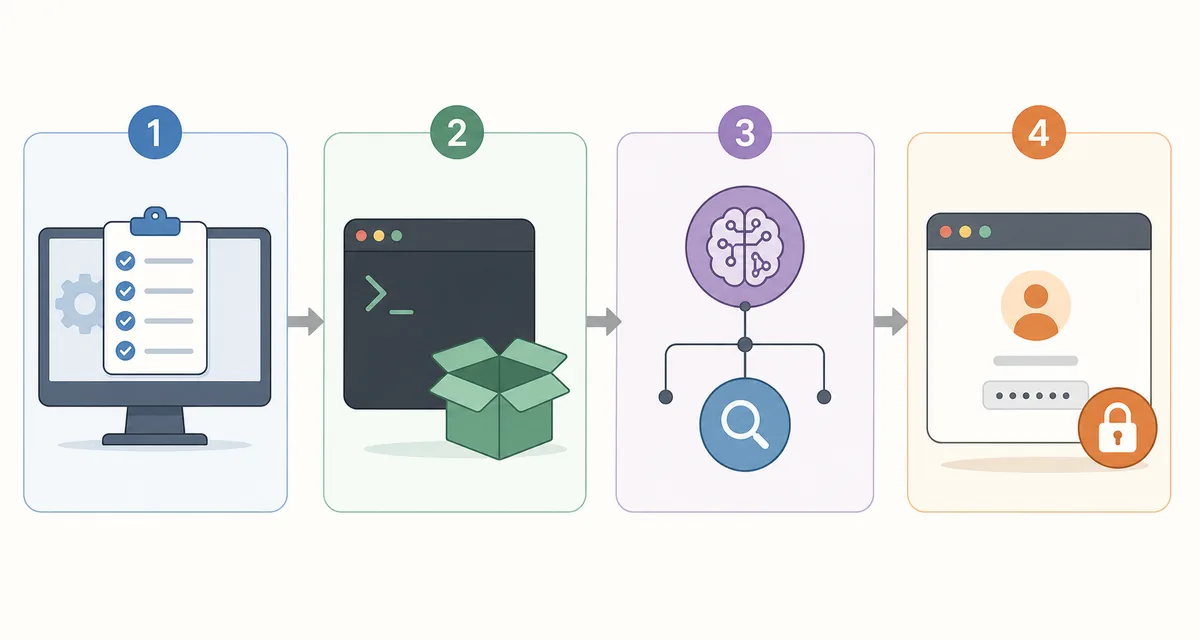
A reliable run workflow separates four decisions: machine readiness, application startup, service connectivity, and user approval. When those decisions are mixed together, every error looks like a model error. When they are separated, you can tell whether the process failed to start, the browser cannot reach it, the model endpoint is wrong, or the workspace is behaving as designed.
Keep a small runbook beside the repository. Record the chosen path, the local URL, the branch or commit you tested, the model endpoint, the search endpoint, the volume or data directory, and the command that stops the stack. This turns the next restart into a known procedure instead of a memory test.
Confirm runtime, storage, ports, and access boundary.
Launch the baseline workspace and read the logs.
Test model and search services separately.
Change credentials and review the first task manually.
Keep each checkpoint observable so a failure has a narrow search area.
Troubleshoot the common run failures
Most first-run failures fall into a small set of categories: the process is not healthy, the browser is using the wrong port, a container is using a different localhost, an optional service is unreachable, or a credential/volume choice is being mistaken for an application bug. Start with the smallest failing layer and avoid changing several variables at once.
If you are following a video or community guide, compare its branch, port, environment variables, and service names with the official repository. A guide can be useful and still be stale. The goal is not to make an old command work at any cost; it is to find the current supported path and record the difference.
| Symptom | Likely boundary | Useful next check |
|---|---|---|
| Browser says connection refused | Process or port | Check container/app health and logs before changing the URL |
| Odysseus cannot reach host Ollama | Docker-to-host networking | Use the endpoint visible from the Odysseus network namespace |
| Search test fails but page opens | SearXNG/provider service | Test the provider URL from the application environment |
| Data disappears after rebuild | Volume or data directory | Inspect Compose volumes and the persistent host path |
| Login works but actions fail | Model, permissions, or workspace state | Run a small task and inspect the provider and approval settings |
| A copied command uses a missing script | Branch or guide drift | Compare the current official README and setup guide |
Update without losing control
There is no universal safe update command that replaces reading the current project instructions. Before pulling changes or rebuilding containers, back up the data that matters, note the tested branch or commit, and check whether environment variables or service names changed. Treat a rebuild as a stateful operation when volumes, databases, documents, or credentials are involved.
For a Docker run, stop and inspect the stack before recreating it. For a native run, preserve the virtual environment and repository changes you understand, then update dependencies deliberately. If you need a public or team-facing deployment, add authentication, HTTPS, network controls, and a rollback plan before the service leaves localhost.
Local-first is a workflow choice, not a security guarantee
Keeping Odysseus on localhost reduces exposure, but it does not remove the need to change credentials, protect volumes, review model access, and understand what a reverse proxy or VPN makes reachable.
Odysseus AI run FAQ
Official sources checked
- Odysseus official repository - Current README, branches, launcher scripts, source setup, and project status.
- Odysseus official setup guide - Docker, native setup, ports, authentication, services, and exposure guidance.
- Docker Engine installation documentation - Official Docker installation guidance for supported Linux distributions.
Related Odysseus AI guides
- Odysseus AI Docker setup - Go deeper on Compose, .env, containers, storage, and host Ollama.
- Odysseus AI Linux install - Compare native Linux and Docker commands with a Linux-specific preflight.
- Odysseus AI Windows setup - Separate Windows, WSL2, Docker Desktop, PowerShell, and Ollama networking.
- Connect Odysseus AI to Ollama - Configure and troubleshoot a local or remote model endpoint.
- How to use Odysseus AI - Continue from a verified installation to the first safe workspace task.
- How private is Odysseus AI? - Understand local inference, connected services, and network exposure.
Last checked against the official repository and setup guide: August 1, 2026
Back to Odysseus AI Wiki